Google launched its big AI-fueled redesign of Google Home late last year, and it has been adding features here and there ever since. Today, the company announced a bigger update that might take care of some of your smart home woes. Camera feeds will be easier to navigate, and the AI event labeling should be more straightforward. The move to Gemini 3.1 for Home voice assistance should also mean the robot is less obtuse and more reliable.
According to Google, Home users who have signed up for the early access channel should already have the update to Gemini 3.1. Google initially released this AI model on other platforms in February, but that rollout didn’t include Google’s smart speakers. With the expansion to Home, Google says those speakers will be able to take advantage of Gemini 3.1’s “advanced reasoning to better interpret and execute complex, multi-step voice commands.” Of course, it says something like that with every Gemini update.
Google has cited various AI evaluations that show Gemini 3.1 is better at parsing big, complex prompts. It showed gains in tests like ARC-AGI-2 and Humanity’s Last Exam, both of which require tricky logic problems that need domain-specific knowledge. How much that kind of capability will benefit a smart speaker that specializes in brief interactions is unclear, but you can have long conversations with Gemini in your smart home devices if you want. Google notes the improved model can process multiple different tasks in a single prompt, saving you from breaking up tasks into multiple commands.
The AI-powered Ask Home feature is also expanding beyond the app with this update. In the near future, the Home-specific Gemini chatbot will be available in the Home web interface, allowing you to conversationally check camera history and create automations. This will start as a preview feature, though.
Google is also adding new automation options, both triggers and actions. Here’s the full list.
- Security & Access Control
- Arm and disarm: Arm security systems, check if the security system is armed
- Door lock monitoring: Checking specific states like locked, unlocked, jammed,
forced open, or ajar. - Binary sensors: Detecting simple true/false states such as contact/no contact,
leak/no leak, or freeze/no freeze.
- Appliance & Cleaning:
- Appliance state (Start & Stop): Controlling operational states (Start, Stop, Pause,
Resume) for devices like washers, dryers, and coffee machines. - Robot vacuums: Specific commands to dock, pause, or resume vacuum cleaning
sessions.
- Appliance state (Start & Stop): Controlling operational states (Start, Stop, Pause,
- Lighting & Environment Control
- Lighting control: Adjusting brightness levels, toggling On/Off, and managing light
effects. - Colored lights: Change the color of a device (light bulb, LED strip, etc.), change
the color temperature of a device - Window coverings: Opening and closing blinds or checking their specific
position percentage. - Climate: Monitoring relative humidity levels via thermostats.
- Lighting control: Adjusting brightness levels, toggling On/Off, and managing light
- Media & Entertainment
- Playback control: Monitoring states like playing, paused, or buffering.
- Volume: Checking and managing volume levels on media devices.
- Device Health & Inputs
- Power management: Monitoring battery levels and charging status.
- Switch events: Utilizing smart switch inputs, including initial presses, long
presses, and release events.
Paying subscribers can use Ask Home to create automations (with or without the new ingredients), but everyone can do it the old-fashioned way with buttons and drop-down menus.
Less camera jank
The 2025 Home app update made a lot of changes, but it didn’t exactly nail the experience. Camera control was still annoying, and the AI notifications weren’t very helpful (or accurate). Today’s update could address at least some of that, but Google says the underlying model is not being upgraded to Gemini 3.1. That’s only for the voice assistant end.
Google says timeline navigation will be much improved now, featuring a higher frame rate when scrubbing through video. That should make it easier to get where you’re trying to go, and if you miss it, there are finally simple skip buttons that take you 10 seconds forward or backward. There are also new swipe controls for switching between timeline/event views and resizing the player window.
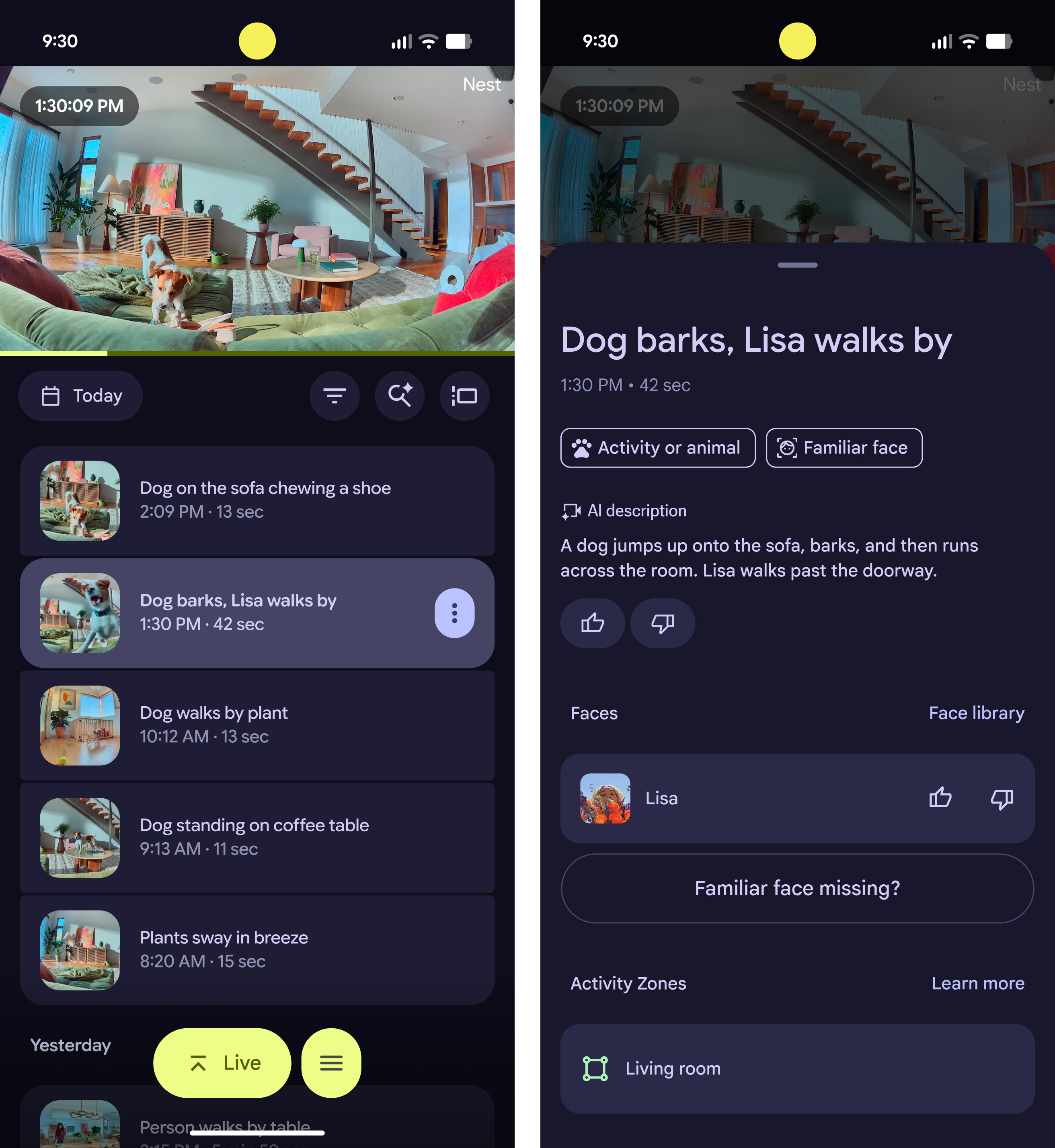
With the move to Gemini, Google Home’s ability to recognize people fell off considerably, making notifications much less useful. Home will now have thumbs up/down feedback buttons, which will help make Familiar Face notifications more accurate over time. Facial recognition will also automatically ignore blurry or obscured images to improve IDs. Notifications and timeline previews will also have better animated preview GIFs that are centered on the subject, too.
The AI model that analyzes camera footage in Google Home has a tendency to mislabel things, which can lead to frustrating and misleading notifications, like telling you there’s a deer in the house. Google isn’t claiming a major change to the quality of descriptions, but the system has apparently been streamlined to make the descriptions simpler. Google says this means you’ll see less cluttered and more straightforward event labels that are “more accurate.” We will see about that.
You won’t get Ask Home or the AI event descriptions with a free Home profile. But those paying for extended footage will see the allegedly simpler AI-generated descriptions in more places. Descriptions will come to the timeline view, as well as to older Nest cameras that previously didn’t work with Gemini. You have to make sure Gemini for Home features are enabled in the camera settings, though.