The change currently rolling out to Gemini will separate your chat history from training, which allows you to retain basic AI functionality without handing Google quite so much control over your data. Prior to this change, the only way to opt out of contributing your chat contents (including attachments) for training was to turn off your history. That made it impossible to go back and pick up a chat down the road.
As the new settings roll out, users will see separate toggles for model training and chat history. The history setting will continue to support an adjustable limit, but you will no longer have to change it to stop Google from training on your Gemini usage. Meanwhile, AI training will be an opt-out situation. You’ll need to find the toggle to block Google from using your chats for AI training. It’s under Activity in the Gemini settings. You can also access the menu from your Google account under Data and Privacy > My Activity > Other activity > Gemini Apps Activity.
Importantly, this only applies to future interactions with Gemini. If you have previously fed any data into Google’s AI, that’s already part of the training data. That can include your inputs, Gemini’s responses, uploaded files, tool calls, your location, and data from connected apps. Google says it may retain this data for up to three years to improve its models. The company has previously noted it attempts to filter personal information out of the Gemini activity history, but that isn’t a guarantee.
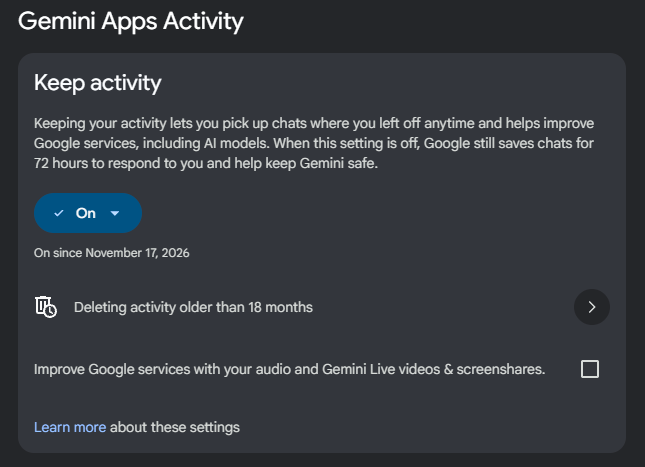
Regardless of your chosen activity settings, you can always manually remove anything you don’t want saved on the same page with the history and training toggles. However, reviewed chats that are already part of the training data won’t be retroactively deleted. Opting out of training doesn’t mean Google won’t have your data, either. Google may use this data in other ways for up to three years—it just won’t add it to AI-training data sets.
If you want to use Gemini and not retain any data, your options are actually a bit more limited now. Currently, if you disable history, Google still retains that data for 72 hours (and 24 hours for the user). Once the updated page is live, this duration will change to two months. So you can access that data for longer, but so can Google. The company says this is to “respond to you, process your feedback, and protect Google, its users, and the public.” Essentially, Google will be more able to identify nefarious AI usage even if someone disables history.
Even with the longer chat retention, the ability to control AI training is still a welcome privacy improvement. Google says the change is rolling out globally, but it may take a few weeks to show up for everyone.
Source: Iwpost.com