
All of Google’s products have been getting more AI features, including Chrome, which now offers split-screen Gemini chatbot support, the ability to automate web browsing, and more. Some desktop Chrome users have also noted that the browser appears to suddenly want more storage space for AI. This is true—Chrome does download a 4GB AI model for on-device processing. It’s been doing that for years, though.
Google hasn’t actually changed anything about Chrome’s on-device AI, but the confusion is understandable, as the company has done a poor job of explaining what it’s doing and why. This is, unfortunately, par for the course with Google’s AI efforts.
Just this week, someone noticed that Chrome had downloaded a 4GB Gemini Nano model and inferred from its sudden appearance that Google was deploying that AI on all Chrome installs right now. That’s not exactly true. Google announced in 2024 that it would begin adding local AI capabilities to Chrome, powering features like Help Me Write, tab organization, and scam detection.
The list of potential uses has changed over time, and Google never rolled the models out universally. It’s possible your machine has been running a local Gemini Nano model since 2024, and it’s also possible the AI was downloaded yesterday. Google tells Ars Technica the flags that determine whether or not Gemini Nano is installed on your machine are multifaceted and include (but are not limited to) your computer’s hardware, account features, and whether you’ve visited a website that uses Google’s on-device Gemini API.
Because Gemini Nano is constantly appearing on machines for the first time, people may think this is something new. In reality, Google confirmed to Ars that Chrome’s Gemini Nano model has been around 4GB in size since it debuted two years ago.
The default problem
So Google has not suddenly decided to gobble up 4GB of your storage space—it did that two years ago, and nobody thought to get upset. But should you? A fresh Chrome install with no extensions eats up 6–8GB of storage, and it will grow considerably with cache and extension data. In a few months, Chrome can occupy 10 times more space than the AI model consumes. Maybe that’s not ideal, either, but that’s just the state of browsers today.
Google says Chrome will delete the model if your machine runs low on storage, and you can turn off local AI features in the Chrome settings with a toggle under the System tab. Flip that off, and Chrome will remove the model and not redownload it. This is a fixable problem, but it shouldn’t be a problem in the first place.
Running AI models locally is generally a good thing—that data stays on your machine rather than feeding a cloud-based model. It’s a positive for privacy and security, and users should have that choice. But “choice” is the operative word, and Google isn’t actually giving you one because AI is Google’s new default. Maybe you don’t want any of these AI features. If that’s the case, Chrome should not consume 4GB of space for something you don’t use without asking.
We’ve seen numerous instances of Google opting everyone into new AI experiences. This is happening more and more as AI becomes the company’s core focus, but Chrome’s AI features show this is not a new phenomenon. Google should have asked if it could have 4GB of your hard drive for AI in 2024, and it should be asking in 2026. But Google knows defaults are powerful, which is why it has paid billions of dollars to be the default search engine on Apple devices.
A curious omission
Google users were more willing to excuse AI in 2024, but the backlash is real in 2026. People are increasingly looking to avoid AI features, which makes this 4GB stealth download all the more questionable. Google’s obsession with AI has led to numerous stumbles, even when the company has ostensibly good intentions, because we are all (rightly!) hyper-focused on how this technology is impacting our lives.
Some of those “good intentions” seem to have made the Chrome situation worse. As users sought ways to remove this AI model, many looked for the settings toggle. This happened to coincide with the wide release of Chrome 148, and the label for this toggle included a pretty suspicious change versus v147.
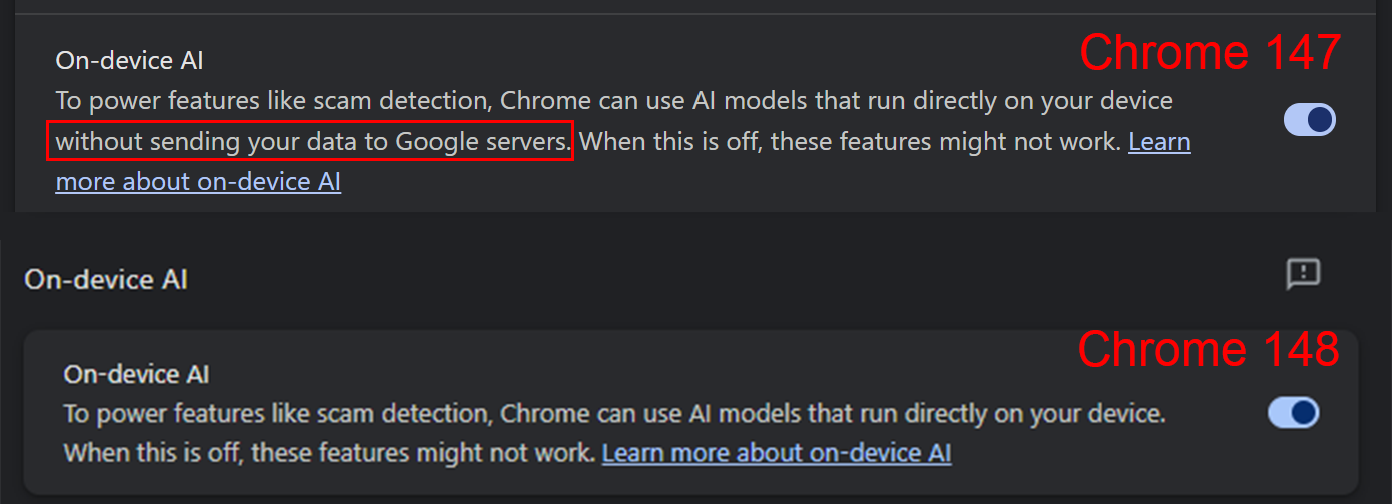
Google removed the stipulation that its on-device AI model would not send data to Google’s servers. This is alarming, as one of the primary benefits of local AI is its greater privacy. We reached out to Google to ask if this wording is due to a change in Chrome’s on-device AI.
“This doesn’t reflect a change to how we handle on-device AI for Chrome,” a Google spokesperson said. “The data that is passed to the model is processed solely on device.”
According to Google, the team decided to make this change earlier in 2026 to ensure it was being crystal clear about how AI works on the web. Chrome’s local AI has an API that a site might use, for example, to do summarization or edit your writing. In these instances, the website would naturally see the input and output. If it’s a Google website, that data ends up on Google’s servers. If it’s a non-Google site, Google doesn’t see any of that data.
That explanation may or may not be satisfying as the backlash against AI grows. Regardless, using the web is never completely private. If you’re uncertain about using AI tools on a site, you should always try to parse its privacy policy, which will tell you how your data (AI-generated or not) will be used. As long as Google is deploying AI as an opt-out service, you’ll have to be extra vigilant.
As the saying goes, it’s easier to ask for forgiveness than permission, but Google ought to be asking for permission a little more often.